Monday, December 22, 2014

Best MP3 Player Under 5000 RS

Best MP3 player under 5000 RS. If you are think to buy a MP3 player which is small, highly portable and you can carry it any where? if yes then here i'm specify some of the best MP3 player under 5,000 RS with it's key features. 
best-MP3-player-under-5000

1. Sony NWZ E383 

best-MP3-player-below-5000-rs
  • 1.77  (4.5 cm) display
  • 4 GB Memory
  • Hi Speed USB
  • 30 Hours Endless Audio
  • USB Base Charging
  • Video/Image Support
2. Philips GoGear Action 4GB MP3 Player

MP3-player-under-5000
  • 4GB Memory
  • 12 Hours Audio Playback
  • Battery Charging Indicator
  • Approx 900 Tracks store
  • Support MP3/WMA/FLAC/APE Sound Format
3. Transcend MP870


best-MP3-player-5000-rs
  • 8GB Memory
  • Support MP3/WMA/FLAC/APE Format
  • Support JPEG/BMP/GIF/PNG Photo Format
  • 22 Hours Audio Playback
  • 2.4 Inch Display
4. Sony NWZ-B183F 4GB MP3 Player


best-MP3-player-st-5000-rs
  • 4GB Memory
  • 1 Line Display
  • FM Support
  • USB Base Charging 
  • 20 Hours Audio Playback
  • Sound Setting: Heavy, POP, Jazz, Unique, Custom 
5. Transcend Digital Music Player MP350B


MP3-player-at-5000-rs
  • 4GB Memory
  • 1 Inch OLED Display
  • 12 Hours Music Playback
  • Sound Format: MP3/WAV/WMA
  • Recording up-to 20 Hours
All MP3 player list below are base on user rate. There are more MP3 player available in market you can also check on other sites. I hope this article is useful for you feel free to mention it in comment box.

Saturday, December 20, 2014

How to Build High Quality Backlinks

One of the secrets to creating more web traffic with your posts is to build in some backlinks. To build high quality backlinks is one of the most popular methods to boost your content over the competition. However, finding the right methods to build the backlinks is going to take a little effort.

Everything starts with understanding what a backlink is and what it will do for your content. From there, you can then extend your efforts to build even more backlinks using creative and effective means that maximizes the potential of your content.

backlinks

What is a Backlink?

A backlink is an incoming hyperlink that connects the web page or content to another website. Backlinks are very important when it comes to page ranking as Google rates them highly. However, the backlinks themselves must be of good quality in order to generate the rankings needed to boost your content ahead of the competition.

Quality of the backlinks is important because having 10 good ones will beat 200 bad ones in terms of Google rankings. So, you must strive for quality each and every time. However, it will take time to build up backlinks to your articles because people will have to see it and then decide to link to it in order to add more value to their site.

If you look at adding good backlinks as a long term strategy, you will eventually reap the rewards that they offer. What follows are some interesting ways to start building good quality backlinks so that you can start your success today a little bit at a time.

Create Long, Interesting Posts

One of the easiest ways to start creating good backlinks is by writing a good, long tutorial post that uses images, charts and other graphics to really make it interesting. It will need to be from 1000 to 1200 words long and not have any filler, so the information really needs to be good and tight to make it interesting.

How-To guides often make the best long posts, especially if you can really hit the details so that people will fully understand how to do what you are explaining to them.

Participate in Forums

A person who is active in the forums when it comes to the subject that you are writing is building a network of potential fans who might offer high quality backlinks to their work. This is a delicate matter as you don't want to come across as someone only interested in what they can do for you. This will mean offering quality backlinks to those who participate in the forum as well if you find their articles useful and informative.

Write e-Books

An e-Book is one of the best ways to help spread the word about your talents and you can ask your friends to share it with the world through social media as well. You can also send your links to the best in social bookmarking sites as well to help augment your efforts.

With e-Books, you don't have to write very many, but it does help if you create ones that are very useful, highly readable and can be shared so that you can build high quality backlinks.

Create Special Days

One of the more interesting ways to build high quality backlinks is creating special days like St. Patrick's Day, Halloween or Valentine's Day to offer discounts on your products or services. You can actually build up to the day as well with special writing and content features to help pull in more traffic.

Remember, you'll need to do some research on your audience to see what type of holidays and content works best for their interest, but Valentine's Day is one that everyone shares, so that is an easy one to write good content, or run a contest that is bound to get good, high quality backlinks.

Have Free Products

Everyone likes free products and this can help you boost the number of visitors to your website. You can have a free e-Book or even a promotional gift if you want. While it may take some investment, the result will be getting more web traffic which in turn creates more demand for your products or services.

Videos

YouTube may very well be the biggest marketing tool of the moment with no signs of slowing down. If you can create a funny, interesting video then you will start getting some great backlinks. Today, the technology to create a solid, professional-looking video is dirt cheap compared to just a decade ago.

You can create "how-to" videos or find something interesting to make a video about as long as it relates to the industry in which your business is in. The key is to do something fun and enjoyable for your audience so that they will start sharing it with their friends.

Interact with Other Blogs

When you read a blog or see a video you like that is within your industry, don't just say "good job" and leave it at that. Write a good, interesting comment or review so that you can really share your thoughts. Remember to be positive, articulate and get right to the point. If you can write your thoughts in an entertaining, audience-pleasing way, you can start building up an audience for your comments and reviews.

Do Guest Blogging

Want to make a great impression? Find a good place to guest blog and write until you get that post to go viral. This will not only attract you an audience, but by helping out someone else you will build high quality backlinks as well.

It will take time, effort and the ability to write well. But if you can pull it off, your stint as a guest blogger will pay off big time for your efforts. The key is to write something that attracts people's attention and provides you with a place to write again for the blogger.

Guest blogging can be very rewarding in more ways than one, so if you have the time to do it right, then you should market your services as a guest blogger.

These are just some of the methods you can use to build high quality backlinks and start building up your web traffic.

What to Do Before Applying for Google AdSense

It seems that everyone wants to make money by joining up with Google AdSense and why not? Google AdSense is a relatively simple, straightforward way to actually start earning some extra money with your efforts. However, things have changed from the early days of AdSense when joining was not much of an issue. Today, applying for AdSense takes more effort and some preparation so that you can take full advantage of their services.

First, you will need a good reason to apply for AdSense so you can reap the benefits that they offer. Here you will find out more about what Google AdSense is all about, what they offer and how you can properly prepare yourself before joining to really take advantage.

applying to google adsense

What is Google AdSense?

One of the most established internet networks to offer advertisement publishing, AdSense uses the Pay Per Click (PPC) system to help businesses reach out to others on the web. At one time, Google used to provide AdSense to everyone who used their Blogspot program, but now that has changed.

Today, AdSense is one of the most respected thanks to the many thousands of satisfied publishers and customers who use the service. It is straightforward, easy to use and always pays on time which makes it very attractive to anyone wanting to have this service. If you do your work the right way, it will pay better than any other similar service on the web.

However, it is their very success that now makes them harder to join. When you apply, everything has to be just right otherwise you will not be approved.

How to Avoid Getting Your Application Rejected

There are a number of things to avoid when applying for AdSense so that your entry will not be discarded. Here are just a few.

Read Google Policies: Just like studying for a test, Google posts their policies about what it takes for your site to get into AdSense. So, take the time to read them and be sure that your website follows the rules.

Have Good Content: If your website doesn't have good or sufficient content, it will not be accepted. So, be sure that you provide them with enough to review. In addition, it has to be neat, professional and grammatically correct otherwise it will give them the excuse to toss out your application.

Aesthetically Pleasing: Garish yellows and lots of distracting glitz will also stop you in your tracks when you apply for AdSense. Your website should have a good, solid design that is comfortable to look at and pleasing for the visitor.

Post Your Contact Information: If Google cannot find a way to contact you through your website, you might as well not apply. Having an "About Us" page with a contact form is the minimum to getting accepted.

Now that you've done the basics, it is time to hedge your bets when it comes to applying for AdSense by adding in items and procedures that will enhance your chances. While nothing is guaranteed, the following steps will help your website in getting approved.

10 Ways to Increase Your Chances when Applying for AdSense

1. Policy for Privacy

It may seem odd to have a privacy policy for your blog, but it is vital if you want to get AdSense approval. Without it, you might as well not apply at all. The policy itself should describe to those who visit your blog what they will see and what they can and cannot do.

2. Contact Information

This is where you put in your contact information. At the very least, it should consist of an email so that readers can contact you directly about any issue they have on your blog.

3. About Us

This is where you tell people a little about who you are, what your business does and how you are going to accomplish it. This is sort of like an introductory page to your efforts and it critical when you apply for Adsense.

4. Email & Name Verification

Be sure that you put your email as well as your name in your About Me or Contact Us page so that it will help Google verify you quickly.

5. Verify Age

Always use your correct name and date of birth when applying for AdSense. This is mostly for those who are under 18, but it is important to be truthful otherwise you'll never get approved.

6. Appropriate Design

Your blog should look attractive, professional and easy to use. You don't have to be fancy or pour in thousands of dollars, just make it clean and neat will be sufficient.

7. Have Plenty of Posts

Do you know that there is no minimum number of posts stated by Google in terms of what is required for joining AdSense? Even so, if you only have a handful, do not count on getting approved. You should shoot for about 500 or so before applying to demonstrate your seriousness about your efforts and make sure that they are at least 500 words in length.

8. Remember the Rules

No pornography, illegal items, advocating drug use or other items that will not get you any AdSense at all. Plus, if your posts are all less than 200 words, that will not work either.

9. Adds Value

Your blog or website must provide real value for your audience. This will not only help keep people visiting your site, but it will also impress Google as well.

10. Unique, Top Level Domain

Basically, this means that your domain should be a ".com" in order to succeed. Plus, the name itself needs to be short as possible, related to your area of interest and easy to remember.

When applying for AdSense, you will need to keep all of these things in mind so that you will be accepted. However, all of the attributes that Google AdSense requires are also ones that will boost your website as well. So, keep this in mind when you apply for AdSense because the result will be a blog that will start earning you another income stream that can build over time.
Monday, December 15, 2014

Best Free Antivirus Apps For Android Mobile

In now a days android device becomes a most popular and increase its popularity day by day. increase the popularity day by day there is risk of viruses and malwares. There for also risk of data and private information. To protect your and protect your did device against antivirus install antivirus apps which i list below.
best-free-android-antivirus-app

Also Read : -Android Smartphone Under 7000 Rs.

In Google Play Store lots of antivirus Apps which protect your data against antivirus.Among of all i select some most popular antivirus apps for your android device which list below.

1. Avast Mobile Security & Antivirus
Rated Of This App: 4.7/5

Avast Mobile Security for mobile phone is a free antivirus app in play store. It will protect your data with automatic scanning and delete infected files. It have web shield that can scan infected URL while you are browsing. It provides many features like AntiTheft and blocking unwanted calls.

2. AVG Antivirus For Android
Rated Of This App: 4.4/5

AVG Antivirus For Android is a free antivirus, which protect your Android device from virus and malware. It also secures your android smartphone at the time of surfing online.It also provides other features like Anti­Theft, SMS Scanner, Task Killer, Real time scanner, Backup Assistant etc.

3. ESET Mobile Security
Rated Of This App: 4.6/5
ESET Mobile Security Apps for Android devices. This is one of best antivirus apps for all android device as well as windows device. It protects your android mobile phone and other devices from virus. This apps can be use on your android device without any worry about connecting to WiFi. This apps alos provide facility of Anti­Theft by using that you can find lost device.

4. Antivirus & Mobile Security
Rated Of This App: 4.3/5
Antivirus & Mobile Security apps that protect your smartphone. It scan and remove virus, malware, spyware and trojan application and vulnerability detection for critical exploits such as Heartbleed, FakeID, Privacy Disaster and Shellshock.It Backup your critical data including contacts, call logs and SMS messages. It have also AntiThet Facility that help you to locate your lost device.

5.Kaspersky Mobile Security
Rated Of This App: 3.9/5
Kaspersky Mobile Security apps that provide protection to your android device. It protects your device against virus and malware. It provides protection against , malicious programs, un-wanted calls and sms and also scans every downloaded file. It has advance Anti­Theft protection by using you can locate your lost device.


The above all apps according to user rating. You can check yourself by installing them on your device.

How To Create A Blog On Blogger Blogspot : Complete Guide For Beginner

Blogger.com is free blogging platform owned by Google and all blog files hosted by Google. so if you looking to create a blog then I would recommend you to create a blog on blogspot blogger.

WordPress.org is self hosted blogging platform and this is not free, in this platform you need to buy Hosting Plan, Custom Domain Name etc. so here you should spend more than 50 Dollars and that's the reason why I recommending you to create free blog on blogger blogspot.

Also blogger is the very easy platform to learn blogging basic and you don't need to learn web languages to manage your blog. once you will learn basic things of blogging then you can migrate your blog on self hosted blogging platform WordPress.org  

create-a-blog-on-blogger-blogspot

In Blogspot platform you don't need to spend a single penny for buying a domain name, you can use sub domain "Blogspot.com". once you get massive traffic to your blog you can setup custom domain name.

As we all know that all blogger media files hosted by Picasa and it will give you 1GB storage space and if you want more storage space then create Google Plus account it will give you 15 GB storage space absolutely Free so here you will save cost of hosting.

How To Create A Blog On Blogger Blogspot : Step By Step Guide


#1 Create Gmail Account And Access Blogger.com :


Firstly you should create Gmail Account to access blogger. if you have already gmail account then just Go To Blooger.com and enter your Gmail ID and Password.

Then you will see New Blog option in top left corner just click on that and you will see create blog window like below image.

how-to-create-a-blog-on-blogger-blogspot

Before creating blog keep one thing in your mind that which type of blog you are creating. like Food blog, Technology blog, Fashion blog etc.

Once you decided Niche of Blogging fill up information like blog title, blog address and choose blogger template which you want to have and click on "Create Blog" button. now you have created your blog. now go to the next step.

#2 Start Blogging :


Now click on the drop down menu which is shown in below image then click on "Posts" and start posting articles and share your blog articles over all social networking sites.

start-your-blog-on-blogger-blogspot


#3 Customizing Blog For Blog Readers :


Customization is very important to attract your visitors and that's why you need to upload custom template for your blog. 

There are several sites provides free blogger templates so just download template and go to Blogger Dashboard >> Template >> Backup/Restore option (which is available on top right corner) and upload blogger template.

change-blogger-template-on-blogger-blogspot

Here now go to Blogger Dashboard >> Layout here you can add your blog logo, favicon, third party widgets like Facebook like box, email subscription box etc.

layout-setting-on-blogger-blogspot

I think you will easily complete this process. after completing this process your blog is ready for your blog readers. now you have to Optimize your blog to get indexed in search engines like Google, Bing, Yahoo.

For (SEO) Search Engine optimization kindly read below tutorial.


#4 Setup AdSense And Start Earning :


Now you have to write at least 20 quality blog posts and then you will able to make money through Adsense just Go to Blogger Dashboard >> Earning and sign up to Google Adsense and fill up Adsense application form and submit.

setup-adsense-on-blogger-blogspot

After submitting Adsense application form, Google will inform you that your account is approved or not in 2 or 3 days. If your account is approved then you can place ads on your blog.

Once you have placed Adense ads on your Blogger blog, keep posting quality articles to start earning money. You will earn money from valid clicks and impressions of ads.

Here is the simple video tutorial to create blog on blogspot: 


Over To You ! 

So friends this was the step by step guide to create a blog on blogspot. I hope this tutorial will help you to start your own blog. for more blogging tips and tutorials keep visiting and stay connected with shoutersclub.

If you have any questions regarding blogging then be open to ask through comment section. I will come back soon with new article till then....

Keep Calm And Start Blogging. smile


Show/Hide Blogger and Google+ Comments System With Toggle

Many Blogger site owners received the new Google+ Comment System pretty negatively because it forced all commenting users to create their own Google+ account before they were able to write a comment. The Google+ Comment System on Blogger was convenient to writers, but discouraged many users from continuing to comment on blogs because they simply didn't want to use Google+. For those that did use Google+ to make a comment, Blogger would never email you and notify you that someone left a comment; you could go days or weeks without ever realizing that you never responded to a reader.

In addition to frustrating your audience, the Google+ Comment System on Blogger depended upon the URL of your blog post. By changing your URLs or moving around your blog posts internally, you run the risk of losing every one of your comments that was placed using Google+.

Previously, the only way to solve this problem was to disable the comment system through your account settings, thus giving up your ability to use their Google+ account. Now, there's an easy new way to have the best of both worlds. Allowing fans of Google+ as well as everyday blog readers to access all same features, you’ll be able to engage every visitor equally. You can respond to comments while still being able to communicate with other Google+ users outside of your site and take advantage of the Google+ Comment System on Blogger.

google plus comments, blogger

How to Integrate Blogger and Google Plus Comments

To make the installation as simple as possible, I used inline jQuery and CSS, but who wants can change this code later. Also, the most accessible place I found to add it would be just after <b:include data='post' name='post'/>. So, let's start adding it:

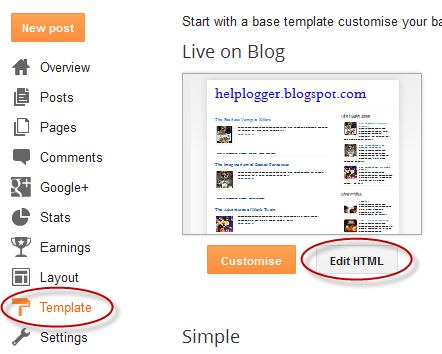
Step 1. Log into your Blogger account and select your blog > go to 'Template' and press the 'Edit HTML' button on the right side.


Step 2. Click anywhere inside the code area and press CTRL + F keys to open the editor's search box and search for the following code:
<b:include data='post' name='post'/>
Step 3. Just after <b:include data='post' name='post'/> add the following code:
<b:if cond='data:blog.pageType == &quot;item&quot;'>
<style>#comments, #gplus-comments-visibility {display:none;} .comments-icons {background: url(https://blogger.googleusercontent.com/img/b/R29vZ2xl/AVvXsEhmNc2ubW_pOarv2k_6nvwaiUIcrhD_rf1fYGZvSfJZC0R-u1kIqU4Eq-tA8PdC9HuQWx1wpM8imqwtpnTwE-lRRYowOOBTRPU4gqu5QL3eO09v6bBYTGaqCK79hAm9fMyhuJfU0BCJgs9w/s1600/speech-bubble.png) no-repeat; font-size: 20px; font-family: &quot;Arial Narrow&quot;,Arial,sans-serif; color: #555; font-weight: bold; padding: 18px 15px 0; height: 70px; } .comments-icons a img {vertical-align: middle;}</style>
<div class='comments-icons'>
Show Comments: <a class='show-hide-comments' href='javascript:void();' onclick='$(&quot;#gplus-comments-visibility&quot;).slideToggle();$(&quot;#comments&quot;).hide();'><img class='gplus-icon' height='35' src='https://blogger.googleusercontent.com/img/b/R29vZ2xl/AVvXsEi2sApTHIqLRPvXYLMsvoPNYzno8PH-tznz-WD5WjR6Icfn_LKhOPh5nA_19rCiE9xaCgEpXfpcMLcHUCdTbOItj79GHIAUACKXpc5byojtxnFU6QAJQsKJQ9KEJGejlJnIMmtgSL4PAqK7/s1600/google-plus-logo.png' width='35'/></a> OR <a class='show-hide-comments' href='javascript:void();' onclick='$(&quot;#comments&quot;).slideToggle();$(&quot;#gplus-comments-visibility&quot;).hide();'><img class='blogger-icon' height='35' src='https://blogger.googleusercontent.com/img/b/R29vZ2xl/AVvXsEjlDf0v_BygxO7luZ0769lAaPPfF1w_mZOeZ9ek3BhWmGNxid7ujIeZi95-WTZhgS7JUQHbIDi4amKINzeruQ6I3GxKjxO1DBMxghhXKrLiNLNEWFuddbdFALyz9f3CJHE12QBvWbLckTzJ/s1600/blogger-logo.png' width='35'/></a>
</div>
<div id='gplus-comments-visibility'>
<div class='g-comments' data-first_party_property='BLOGGER' data-view_type='FILTERED_POSTMOD' data-width='550' expr:data-href='data:post.url'/>
</div>      
</b:if>

Note: data-width is for setting the width of the comment box, so the number (550) indicated there can be changed according to the design of your blog.

Step 4. Press the "Save Template" button located at the top of the editor and view your blog to see if you have successfully added Google+ commenting system to Blogger.

Please note that in order to make this work, you need to make sure that you are using a version of jQuery in your site. Otherwise, add this line just above the </head> tag using the HTML template editor:
<script src='https://ajax.googleapis.com/ajax/libs/jquery/1.6.4/jquery.min.js' type='text/javascript'/>
That's it!
From now on, any reader that views your post has the option of making a comment using their Google+ account, or the native Blogger comments. Your readers will enjoy the flexibility that your site provides and you will also benefit from the inclusive services offered by Google.
Google Public DNS and Location-Sensitive DNS Responses

Google Public DNS and Location-Sensitive DNS Responses

Webmaster level: advanced

Recently the Google Public DNS team, in collaboration with Akamai, reached an important milestone: Google Public DNS now propagates client location information to Akamai nameservers. This effort significantly improves the accuracy of approximately 30% of the location-sensitive DNS responses returned by Google Public DNS. In other words, client requests to Akamai hosted content can be routed to closer servers with lower latency and greater data transfer throughput. Overall, Google Public DNS resolvers serve 400 billion responses per day and more than 50% of them are location-sensitive.

DNS is often used by Content Distribution Networks (CDNs) such as Akamai to achieve location-based load balancing by constructing responses based on clients’ IP addresses. However, CDNs usually see the DNS resolvers’ IP address instead of the actual clients’ and are therefore forced to assume that the resolvers are close to the clients. Unfortunately, the assumption is not always true. Many resolvers, especially those open to the Internet at large, are not deployed at every single local network.

To solve this issue, a group of DNS and content providers, including Google, proposed an approach to allow resolvers to forward the client’s subnet to CDN nameservers in an extension field in the DNS request. The subnet is a portion of the client’s IP address, truncated to preserve privacy. The approach is officially named edns-client-subnet or ECS.

This solution requires that both resolvers and CDNs adopt the new DNS extension. Google Public DNS resolvers automatically probe to discover ECS-aware nameservers and have observed the footprint of ECS support from CDNs expanding steadily over the past years. By now, more than 4000 nameservers from approximately 300 content providers support ECS. The Google-Akamai collaboration marks a significant milestone in our ongoing efforts to ensure DNS contributes to keeping the Internet fast. We encourage more CDNs to join us by supporting the ECS option.

For more information about Google Public DNS, please visit our website. For CDN operators, please also visit “A Faster Internet” for more technical details.


Wednesday, December 10, 2014

7 Sure Shot Ways To Get High Quality Backlinks To Your Blog

Recently I have posted 10 basic important On Page SEO tips to optimize your whole blog for search engines.

Link building is one of the most important part of SEO which helps you to get high page rank on Google and other search engines. as well as Google gives more importance to your blog pages. 

So today we are going to discuss about another most important part of SEO is Backlink and  I will show you some sure-shot ways to get free quality backlinks to your blog.

high-quality-backlinks

Many bloggers focuses on low quality backlinks or buying backlinks but this is not the right way to get backlinks. if you want quality backlinks then you should get backlinks from high domain authority blogs.

Also Read: 10 On Page SEO Tips To Optimize Your Blog For Search Engines

Also Read: 10 Common SEO Mistakes You Should Stop Making Right Now

If you have low quality backlinks or broken links then your blog will get penalized by Google penguin and sandbox effect .After Google updating his system with many algorithms like panda, hummingbird and now penguin is rolled out so now day link building is going to be harder and harder for newbie bloggers.

SureShot Ways To Get High Quality Backlinks : 


#1 Comment On Other Blogs :


Blog commenting is one of the best way to get backlink from any website and you can maintain your relationship among bloggers easily as well. so comment on dofollow and commentluv enabled blogs to get backlink.

Don't be selfish while commenting. i mean give some appreciation to their work.

Tip: Don't leave your comment in single line and out of a topic if you are doing that type of mistake then your comment may get disapproved.

#2 Guest Blogging : 


Guest blogging is also effective way to get high quality backlink.  if you are looking for guest blogging then keep some points in your mind which helps you to get approval of your guest post :
  • Don't submit post which is not relevant to their niche.
  • Don't write tiny post, write at least 800 to 1,000 word article.
  • Don't submit old, repeated or copied article. it creates bad impression so submit untouched article.

If you keeping this points in your mind then surely your post will get approved. after submitting guest post you will get good traffic. 


#3 Submit Your Blog In Blogger Directories :


Submit your blog in Top blog directories which helps you to get some of traffic and also quality backlinks.
don't submit your blog in low page rank  blogs because I am here to show you how to get High Quality backlinks and low page rank directories means you can't get high quality backlinks. so keep this point in your mind.


#4 Social Media Sharing :


We all know social media is the one of the best way to get instant, huge traffic and backlinks. if your post is worth read then your first social media visitor will become your loyal reader. 

Several groups available on Facebook where you can submit your blog article. so I recommend you to join maximum Facebook groups and Google plus communities and then you will see some changes in your traffic stats.

Tip : Don't forget to use #Hash tag while sharing blog post on social. its playing a hidden role to improve your post views.

 #5 Write Unique And High Quality Contents :


"First impression is the last impression" this line going to be perfectly fit in this sentence because if your first visitor satisfy with your articles then he will come to your blog again and again.

Always try to publish unique and high quality contents for your visitors. many blogging communities accepts only unique and well explained articles so here good quality of contents matter a lot.

Writing unique and high quality contents is not easy. if you want to make your contents readable then keep updating yourself through reading articles related to your niche and do some paper work before writing blog post.

Also Read: How To Hold Visitors For A Longer Time On Your Blog


#6 Promote visual contents :


Here you can get organic and natural backlinks. Visual contents attracts visitors more than words because they can understand easily what you want to say. so try to create viral videos, Infografics, Power Point Presentations, PDF files or convert your blog articles into PPT or PDF and submit these files on various websites like :

  • Videos : You Tube, Dailymotion, vimeo etc
  • PPT and PDF : Slideshare, Scribd.com etc
  • Infografic : visual.ly, slideshare, infographicsshowcase, infographicsarchive, submitinfographics etc


#7 Eyes On Trend :


Find out what's trending on social media and whats peoples talking about?. so whenever you will get the trending point  related to your niche then pick this topic and make your article. you will get instant result from visitors so keep eyes on trend.

You can also find popular questions on Yahoo Answers and Quora. then you have a two choices either answer the question with your link or if don't have this article on your blog then make article on this question then provide your article link below that question to read full post. 


Final Words !


    Using the 7 ways above will give you a nice start to get quality backlinks to your blog. and you will make your own space in blogosphere.

    I hope you enjoyed this post. for more tips keep in touch. and don't forget to join our newsletter. if you have any suggestions then please feel free to ask via comment section.

    Tuesday, December 9, 2014

    The four steps to appiness

    Webmaster Level: intermediate to advanced

    App deep links are the new kid on the block in organic search, and they’re picking up speed faster than you can say “schema.org ViewAction”! For signed-in users, 15% of Google searches on Android now return deep links to apps through App Indexing. And over just the past quarter, we've seen the number of clicks on app deep links jump by 10x.

    We’ve gotten a lot of feedback from developers and seen a lot of implementations gone right and others that were good learning experiences since we opened up App Indexing back in June. We’d like to share with you four key steps to monitor app performance and drive user engagement:

    1. Give your app developer access to Webmaster Tools

    App indexing is a team effort between you (as a webmaster) and your app development team. We show information in Webmaster Tools that is key for your app developers to do their job well. Here’s what’s available right now:

    • Errors in indexed pages within apps
    • Weekly clicks and impressions from app deep link via Google search
    • Stats on your sitemap (if that’s how you implemented the app deep links)
    ...and we plan to add a lot more in the coming months!

    We’ve noticed that very few developers have access to Webmaster Tools. So if you want your app development team to get all of the information they need to fix app-related issues, it’s essential for them to have access to Webmaster Tools.

    Any verified site owner can add a new user. Pick restricted or full permissions, depending on the level of access you’d like to give:

    2. Understand how your app is doing in search results

    How are users engaging with your app from search results? We’ve introduced two new ways for you to track performance for your app deep links:

    • We now send a weekly clicks and impressions update to the Message center in your Webmaster Tools account.
    • You can now track how much traffic app deep links drive to your app using referrer information - specifically, the referrer extra in the ACTION_VIEW intent. We're working to integrate this information with Google Analytics for even easier access. Learn how to track referrer information on our Developer site.

    3. Make sure key app resources can be crawled

    Blocked resources are one of the top reasons for the “content mismatch” errors you see in Webmaster Tools’ Crawl Errors report. We need access to all the resources necessary to render your app page. This allows us to assess whether your associated web page has the same content as your app page.

    To help you find and fix these issues, we now show you the specific resources we can’t access that are critical for rendering your app page. If you see a content mismatch error for your app, look out for the list of blocked resources in “Step 5” of the details dialog:

    4. Watch out for Android App errors

    To help you identify errors when indexing your app, we’ll send you messages for all app errors we detect, and will also display most of them in the “Android apps” tab of the Crawl errors report.

    In addition to the currently available “Content mismatch” and “Intent URI not supported” error alerts, we’re introducing three new error types:

    • APK not found: we can’t find the package corresponding to the app.
    • No first-click free: the link to your app does not lead directly to the content, but requires login to access.
    • Back button violation: after following the link to your app, the back button did not return to search results.

    In our experience, the majority of errors are usually caused by a general setting in your app (e.g. a blocked resource, or a region picker that pops up when the user tries to open the app from search). Taking care of that generally resolves it for all involved URIs.

    Good luck in the pursuit of appiness! As always, if you have questions, feel free to drop by our Webmaster help forum.

    Wednesday, December 3, 2014

    Are you a robot? Introducing “No CAPTCHA reCAPTCHA”

    reCAPTCHA protects the websites you love from spam and abuse. So, when you go online—say, for some last-minute holiday shopping—you won't be competing with robots and abusive scripts to access sites. For years, we’ve prompted users to confirm they aren’t robots by asking them to read distorted text and type it into a box, like this:
    But, we figured it would be easier to just directly ask our users whether or not they are robots—so, we did! We’ve begun rolling out a new API that radically simplifies the reCAPTCHA experience. We’re calling it the “No CAPTCHA reCAPTCHA” and this is how it looks:
    On websites using this new API, a significant number of users will be able to securely and easily verify they’re human without actually having to solve a CAPTCHA. Instead, with just a single click, they’ll confirm they are not a robot.
    A brief history of CAPTCHAs 

    While the new reCAPTCHA API may sound simple, there is a high degree of sophistication behind that modest checkbox. CAPTCHAs have long relied on the inability of robots to solve distorted text. However, our research recently showed that today’s Artificial Intelligence technology can solve even the most difficult variant of distorted text at 99.8% accuracy. Thus distorted text, on its own, is no longer a dependable test.

    To counter this, last year we developed an Advanced Risk Analysis backend for reCAPTCHA that actively considers a user’s entire engagement with the CAPTCHA—before, during, and after—to determine whether that user is a human. This enables us to rely less on typing distorted text and, in turn, offer a better experience for users.  We talked about this in our Valentine’s Day post earlier this year.

    The new API is the next step in this steady evolution. Now, humans can just check the box and in most cases, they’re through the challenge.

    Are you sure you’re not a robot?

    However, CAPTCHAs aren't going away just yet. In cases when the risk analysis engine can't confidently predict whether a user is a human or an abusive agent, it will prompt a CAPTCHA to elicit more cues, increasing the number of security checkpoints to confirm the user is valid.
    Making reCAPTCHAs mobile-friendly

    This new API also lets us experiment with new types of challenges that are easier for us humans to use, particularly on mobile devices. In the example below, you can see a CAPTCHA based on a classic Computer Vision problem of image labeling. In this version of the CAPTCHA challenge, you’re asked to select all of the images that correspond with the clue. It's much easier to tap photos of cats or turkeys than to tediously type a line of distorted text on your phone.
    Adopting the new API on your site

    As more websites adopt the new API, more people will see "No CAPTCHA reCAPTCHAs".  Early adopters, like Snapchat, WordPress, Humble Bundle, and several others are already seeing great results with this new API. For example, in the last week, more than 60% of WordPress’ traffic and more than 80% of Humble Bundle’s traffic on reCAPTCHA encountered the No CAPTCHA experience—users got to these sites faster. To adopt the new reCAPTCHA for your website, visit our site to learn more.

    Humans, we'll continue our work to keep the Internet safe and easy to use. Abusive bots and scripts, it’ll only get worse—sorry we’re (still) not sorry.


    Facebook Popup Like Box Widget For Blogger

    Facebook has become the leading social media service on the Internet playing host to over 1.3 billion users; of those, 800 million login to their dashboard feeds at least once a day. Thanks to the vast number of active users on services like Facebook, acquiring new readers as a blogger or content provider has become easier than ever.

    In order to produce an effective digital campaign, you absolutely must take advantage of social media by doing things like integrating Facebook on Blogger. Email marketing can be useful, but it comes with restrictions that could limit your blog's potential. Perhaps the most significant problem is that emails don't come with a face or personality like Facebook does.

    Think of a time when you received an email in you inbox from someone you didn't know. Where you inclined to open it or did you send it right to the junk folder? If it's your first introduction to new consumer, they simply don't know who you are, what you want, and how you got their email. This sets off an initial breakdown of any type of trust that might have developed. The reputation of email marketing is further deteriorated with a study done by Kaspersky Lab, an Internet research firm. They estimate that around 70% of all the emails sent in the world are spam.

    Sharing site content using a Facebook Like Box is just one of many strategies that can generate a regular flow of traffic from a diverse demographic that might have been previously inaccessible. Adding a Facebook Like Box to your site helps to reduces your individual workload, and instead distributes that ability equally among your readers.

    When someone reads your content and appreciates the kind of work that you produce, they'll be willing to share that information to their followers and fans, setting off a viral reaction. The first step necessary to making this a reality is to make this change to your site. These next few steps will provide you with a quick and easy guide on how to add a 'Like Box' to your Blogger site so that you can began taking advantage of these great opportunities.


    Click here for a DEMO


    How to Add the Facebook Popup Like Box Widget

    1. Log into your Blogger account and select your blog > go to 'Layout' & click the 'Add a Gadget' link on the right side.
    2. Once the popup window is open, select the HTML/JavaScript gadget from the list:


    3. Copy and paste the following code inside the empty box:
    <script src='http://ajax.googleapis.com/ajax/libs/jquery/1.7.2/jquery.min.js' type='text/javascript'></script>
    <style type="text/css">
    #fbox-background{display:none;background:rgba(0,0,0,0.8);width:100%;height:100%;position:fixed;top:0;left:0;z-index:99999}#fbox-close{width:100%;height:100%}#fbox-display{background:#eaeaea;border:5px solid #828282;width:340px;height:230px;position:absolute;top:32%;left:37%;-webkit-border-radius:5px;-moz-border-radius:5px;border-radius:5px}#fbox-button{float:right;cursor:pointer;position:absolute;right:0;top:0}#fbox-button:before{content:"CLOSE";padding:5px 8px;background:#828282;color:#eaeaea;font-weight:700;font-size:10px;font-family:Tahoma}#fbox-link,#fbox-link a.visited,#fbox-link a,#fbox-link a:hover{color:#aaa;font-size:9px;text-decoration:none;text-align:center;padding:5px}
    </style>
    <script type='text/javascript'>
    //<![CDATA[
    jQuery.cookie=function(a,b,c){if(arguments.length>1&&"[object Object]"!==String(b)){if(c=jQuery.extend({},c),null!==b&&void 0!==b||(c.expires=-1),"number"==typeof c.expires){var d=c.expires,e=c.expires=new Date;e.setDate(e.getDate()+d)}return b=String(b),document.cookie=[encodeURIComponent(a),"=",c.raw?b:encodeURIComponent(b),c.expires?"; expires="+c.expires.toUTCString():"",c.path?"; path="+c.path:"",c.domain?"; domain="+c.domain:"",c.secure?"; secure":""].join("")}c=b||{};var f,g=c.raw?function(a){return a}:decodeURIComponent;return(f=new RegExp("(?:^|; )"+encodeURIComponent(a)+"=([^;]*)").exec(document.cookie))?g(f[1]):null};
    //]]>
    </script>
    <script type='text/javascript'>
    jQuery(document).ready(function($){
    if($.cookie('popup_facebook_box') != 'yes'){
    $('#fbox-background').delay(5000).fadeIn('medium');
    $('#fbox-button, #fbox-close').click(function(){
    $('#fbox-background').stop().fadeOut('medium');
    });
    }
    $.cookie('popup_facebook_box', 'yes', { path: '/', expires: 7 });
    });
    </script>
    <div id='fbox-background'>
    <div id='fbox-close'>
    </div>
    <div id='fbox-display'>
    <div id='fbox-button'>
    </div>
    <iframe allowtransparency='true' frameborder='0' scrolling='no' src='//www.facebook.com/plugins/likebox.php?
    href=https://www.facebook.com/pages/Helplogger/120574614736021&width=339&height=255&colorscheme=light&show_faces=true&show_border=false&stream=false&header=false'
    style='border: none; overflow: hidden; background: #fff; width: 339px; height: 200px;'></iframe>
    <div id="fbox-link">Powered by <a style="padding-left: 0px;" href="http://helplogger.blogspot.com/2014/12/facebook-popup-like-box-blogger-widget.html" rel="nofollow">Helplogger</a></div>
    </div>
    </div>
    4. Press the 'Save' button to add the widget to your blog. That's it!

    Facebook Popup Like Box Customization

    After adding the code, replace the address in blue https://www.facebook.com/pages/Helplogger/120574614736021 with your site's facebook page URL.

    The widget will appear 5 seconds after the page finishes loading. If you want to change this delay, change the number 5000 to a greater or lesser number in this part:
    .delay(5000)
    By default, the like box only shows up the first time the user visits your page.  If you would like the Facebook box to popup every time the page loads, then remove this line of code:
    $.cookie('popup_facebook_box', 'yes', { path: '/', expires: 7 });
    If you want to display only when user visits your homepage, go to 'Template' > hit the 'Edit HTML' button on the right side and search by clicking anywhere inside the code area and pressing the CTRL + F keys for this tag:
    </body>
    Paste the facebook popup widget right above the body tag and make sure to include the conditional tags below:
    <b:if cond='data:page.type == "index"'>ADD THE FACEBOOK WIDGET CODE HERE </b:if>
    After saving this widget, you can test it out by returning to one of your old posts which should bring up a little popup widget asking if you'd like to join the site's Facebook page.

    If you don't see the Facebook Like Box on the page, you may need to delete your cookies or check out the 'Customization' section above in order to display the widget every time a user visits your site. Once this widget is added to your site, all your hard work should start to translate into an increase in web traffic and number of Facebook fans.

    Thursday, November 27, 2014

    Tahukah Anda Apa Alasan Saya Menutup Komentar Di Blog Ini?

    Sebetulnya alasan kenapa saya menutup komentar yang mengandung link di blog ini, bukan karena pelit, justru sebab saya kasihan kepada sahabat yang hanya meninggalkan komentar spam. Ini mungkin SEO tips yang masih belum dipahami dengan benar oleh sebagian kawan-kawan blogger hingga saat ini. Sejak diluncurkannya beberapa alogaritma terbaru Google mulai pertengahan tahun 2013 lalu hingga saat ini banyak blog spam yang semula berada di halaman pertama search engine akhirnya berterbangan ke halaman antah berantah, bahkan malah hilang dari mesin pencari.

    Bahkan salah satu blog rekan kita yang baik (cara-ririn.blogspot.com) miliknya Wahyu Eka Prasetiyarini hingga saat ini diblokir pihak google dan masih belum pulih. Setelah mendengar informasi menurut keterangan mbak Ririn sendiri penghapusan blogspotnya tersebut berawal dari banyaknya komentar yang dianggap spam.

    Jadi sebaiknya jangan sia-siakan usaha blogwalking Anda hanya dengan meninggalkan komentar spam. Semalas-malasnya menulis, paling tidak tinggalkan komentar berupa sebaris kalimat yang isinya berhubungan dengan konten yang diberi komentar. Mungkin tadinya sahabat bermaksud ingin mendapatkan backlink dengan cara meninggalkan link pada komentar yang dibuat, namun jika komentar nantinya dianggap spam baik oleh Admin blog, atau oleh google justru yang didapat bukannya backlink tapi malah sanksi google penalty.
    komentar-spam
    Masih mending blog terlempar ke halaman antah berantah di search engine, yang fatal lagi bagaimana jika blog Anda malah dihapus? Rugi bukan. Hanya menulis sebaris kata yang ada hubungannya dengan artikel yang dikomentari saya rasa tidak akan menghabiskan waktu, justru selain mempunyai dua keuntungan. Pertama komentar pastinya akan dipublish oleh Admin blog yang bersangkutan. Keuntungan kedua komentar tersebut dapat menjadi backlink untuk blog Anda sendiri.

    Tahukah Anda dengan meninggalkan link dan komentar yang relevan meskipun di blog yang nofollow untuk SEO saat ini, itu tetap bisa menjadi backlink, jadi tidak harus lagi hanya berkomentar dan meninggalkan link di blog yang dofollow saja. Saya sudah buktikan hal tersebut dengan berkomentar dibeberapa blog nofollow, ternyata seminggu kemudian setelah dicek, link di blog nofollow tersebut juga bertambah menjadi backlink.

    Jadi berkomentarlah dengan baik menggunakan beberapa baris kalimat yang isinya sesuai dengan posting yang dikomentari. Jangan cuma nyepam aja seperti hanya menulis komentar dengan dua kata "Trimakasih Infonya" itu termasuk spammer Comment. Kerugiannya yaitu selain tidak menguntungkan bagi Anda karena tidak menjadi backlink, kemungkinan besar komentar seperti itu tidak akan dipublish oleh Admin blog yang diberi komentar. Celakanya lagi jika nanti blog Anda malah ditandai sebagai spammer. Kalau sudah begitu SEO tips apapun yang dilakukan, saya rasa tidak akan banyak membantu menyelamatkan blog Anda dari sanksi search engine. Tips kali ini saya rasa itu yang penting yang ingin saya bagikan buat sahabat blogger yang baik mengenai komentar spam yang bisa berakhir dengan sanksi banned, semoga bisa membantu.

    Thursday, November 20, 2014

    Cara Menampilkan Gambar Hanya Dihalaman Homepage

    Cara menampilkan gambar hanya dihalaman homepage dengan CSS. Berawal dari keinginan untuk bisa menampilkan gambar hanya di halaman beranda saja, saya blogwalking dan nemu tipsnya dari blog Kang Ismet. Ternyata caranya sangat mudah sekali, cukup menggunakan CSS dan tidak membutuhkan javascript ataupun jquery khusus.

    Alasan kenapa saya ingin agar gambar yang ada di dalam posting tidak tampil di halaman artikel namun tetap bisa tampil sebagai thumbnail di halaman homepage, karena ingin supaya posting yang dipublikasikan terlihat rapih. Contoh di artikel yang saya tulis ini, gambarnya tidak tampil di postingan namun tetap bisa muncul di halaman homepage.

    Sementara jika di dalam artikel tersebut tidak saya masukan gambar, maka otomatis dihalaman homepage gambar thumbnailnya kosong. Karena kebetulan di salah satu blog tersebut saya memakai template yang ada gambar thumbnailnya, jadi kelihatan jelek kalau yang muncul cuma tulisan "No Image" saja. Kalau temen-temen juga mungkin ada yang menginginkan gambar diposting tidak muncul namun dihalaman homepage tetap tampil, silahkan gunakan cara berikut. 

    Menampilkan Gambar Hanya Dihalaman Homepage
    • Login ke dashboard blogger
    • Pilih Template
    • Edit HTML
    • Format Template
     Tempatkan script di bawah ini setelah atau di atas kode </head>
    <b:if cond='data:blog.pageType == &quot;item&quot;'>
    <style type='text/css'>
    .thumbnail {display:none}
    </style>
    </b:if>
    • Jika sudah Klik Save Template
    Langkah berikutnya yang harus dilakukan yaitu menambahkan sedikit kode kedalam url gambar yang ada disetiap posting. Berikut kode yang harus ditambahkan pada url gambaruntuk setiap artikel yang gambarnya hanya ingin muncul dihalaman homepage. Ingat hanya pada gambar yang ingin muncul di homepage saja tidak untuk semua gambar yang ada di dalam artikel.
    • Kode yang harus ditambahkan
     class="thumbnail"
    • Sehingga lengkapnya nanti akan menjadi seperti berikut.
    <img class="thumbnail" src="url-link-gambar" alt="penjelasan gambar" />
    Akan lebih mudah tidak perlu merubah semua kode url gambar yang telah ada di dalam posting, cukup hanya menambahkan kode tersebut sebelum "scr". Cukup mudah bukan, silahkan dicoba dan lihat hasilnya. Semoga membantu dan bermanpaat.

    Tuesday, November 18, 2014

    Helping users find mobile-friendly pages

    Webmaster level: All

    Have you ever tapped on a Google Search result on your mobile phone, only to find yourself looking at a page where the text was too small, the links were tiny, and you had to scroll sideways to see all the content? This usually happens when the website has not been optimized to be viewed on a mobile phone.

    This can be a frustrating experience for our mobile searchers. Starting today, to make it easier for people to find the information that they’re looking for, we’re adding a “mobile-friendly” label to our mobile search results.
    Mobile-friendly search result
    This change will be rolling out globally over the next few weeks. A page is eligible for the “mobile-friendly” label if it meets the following criteria as detected by Googlebot:
    • Avoids software that is not common on mobile devices, like Flash
    • Uses text that is readable without zooming
    • Sizes content to the screen so users don't have to scroll horizontally or zoom
    • Places links far enough apart so that the correct one can be easily tapped
    If you want to make sure that your page meets the mobile-friendly criteria: 
    The tools and documentation above are currently available in English. They will be available in additional languages within the next few weeks.

    We see these labels as a first step in helping mobile users to have a better mobile web experience. We are also experimenting with using the mobile-friendly criteria as a ranking signal.

    If you have any questions or want to help others make mobile-friendly sites, visit our Webmaster Help Forum. We hope to see many more mobile-friendly websites in the future. Let’s make the web better for all users!

    Monday, November 17, 2014

    Cara Meningkatkan Pendapatan Adsense Dari Niche Blog

    Cara meningkatkan pendapatan adsense dari blog dengan membuat blog niche tertentu. Seperti yang kita tahu trafik adalah napas hidup bagi blog yang dimonetisasi dengan adsense. Jadi pilihan terbaik untuk meningkatkan penghasilan adsense adalah dengan memilih niche apa yang paling banyak dicari orang di internet. Ketika akan membangun sebuah blog perhatikan konten atau topik utama yang akan dijadikan sebagai niche untuk blog yang akan dibuat. Sebab jika salah dalam memilih topik, alhasil nantinya blog mungkin sepi dengan pengunjung.

    Contohnya saja blog ini, situs dengan topik blogging tips, atau SEO tips sebetulnya bukan merupakan niche yang bagus untuk dimonetisasi dengan adsense. Sebab trafik blog SEO lebih terbatas kepada pesaing, artinya kebanyakan orang yang berkunjung ke blog dengan topik SEO atau blogging tips adalah mereka yang juga berprofesi sama, atau orang yang sedang mempelajari bagaimana cara membuat blog. Dari jutaan orang pengguna internet, hanya sebagian kecil yang sebetulnya mencari tau tentang cara membuat blog, blogging tips, seo tips dan semua yang berhubungan dengan blog.

    cara-meningkatkan-penghasilan-adsense
    Sementara kebanyakan pengguna internet lainnya adalah mereka yang mencari solusi atau kebutuhan hidup sehari-hari. Nah sekarang sudah tau bukan apa yang harus dikerjakan? Dan blog dengan topik apa yang harus dibuat jika ingin meningkatkan lebih banyak trafik serta penghasilan setiap bulannya dari adsense. Blog dengan topik SEO seperti blog ini, paling tinggi trafik pengunjung per harinya hanya mencapai 1K, bahkan jika dihitung dengan persentase rata-rata trafik blog dengan tema SEO seperti blog ini trafik pengunjung berada jauh di bawah kisaran 1000 orang/hari, menyedihkan bukan? Sekalipun ranking alexanya sudah ramping bahkan blog sudah memiliki pagerank, jika topik yang dipilih tidak banyak dicari orang di internet, tetap saja situs akan sepi pengunjung.

    Blog SEO ini sebetulnya saya buat untuk berbagi pengalaman dan pengetahuan seputar blogging tips, khusunya untuk anak-anak didik saya di sekolah. Dengan maksud sebagai contoh bagaimana cara membuat blog dan apa saja yang harus dipersiapkan. Jadi bagi pemula yang mulai serius ingin menekuni aktifitas di dunia blogging, dan berharap bisa mendapatkan penghasilan besar dari kegiatan membangun sebuah blog, sebaiknya buatlah blog dengan niche atau topik yang sipatnya lebih dibutuhkan oleh umum. Artinya konten di dalamnya tidak ditujukan kepada pembaca tertentu.

    Niche umum cenderung memiliki trafik tidak terbatas, sebab siapapun bisa membutuhkan dan mencarinya kapan saja, tidak seperti topik blog ini di mana pengunjungnya hanya terbatas kepada pembaca tertentu saja, yaitu mereka yang juga sama berprofesi sebagi pemilik blog atau para pemula yang baru saja terjun ke dunia blogging. Semoga informasi yang saya sampaikan ini berguna dan sedikit bisa membantu, happy blogging!